
Blogs
Could the Lenovo ThinkPad T580 Be Your Next Smart Laptop Buy?


Finding a laptop that balances performance, screen size, storage and everyday convenience can make a big difference when choosing a computer for work or study. The Lenovo ThinkPad T580 combines an 8th Generation Intel Core i5 processor, 16GB RAM and a 256GB SSD with a spacious 15.6-inch display. At Ryan and Troy Store, we help customers compare laptop specifications to find a device that suits their daily tasks and budget.
This Ex-USA ThinkPad T580 also features a backlit full-size keyboard, a numeric keypad, Windows 11 Pro and a dual-battery configuration. Whether the laptop is needed for office work, business administration, spreadsheets or online learning, let’s look at what makes this model worth considering.
Lenovo ThinkPad T580 Specifications
| Specification | Details |
|---|---|
| Brand | Lenovo |
| Series | ThinkPad |
| Model | ThinkPad T580 |
| Processor | Intel Core i5-8250U |
| Processor Generation | 8th Generation Intel Core i5 |
| RAM | 16GB DDR4 |
| Storage | 256GB SSD |
| Usable Storage | Approximately 238GB |
| Display | 15.6-inch |
| Touchscreen | No |
| Graphics | Intel UHD Graphics 620 |
| Operating System | Windows 11 Pro 64-bit |
| Keyboard | Full-size with numeric keypad |
| Keyboard Backlight | Yes |
| Pointing Device | TrackPoint and touchpad |
| Webcam | Yes, with privacy shutter |
| Battery | Dual battery |
| Colour | Black |
| Type | Business / Professional Laptop |
What Makes the Lenovo ThinkPad T580 Worth Considering?
1. Intel Core i5-8250U for Everyday Productivity
The Lenovo ThinkPad T580 is powered by the Intel Core i5-8250U, an 8th Generation processor with four cores and eight threads. It has a base frequency of 1.60 GHz and can reach turbo speeds of up to 3.40 GHz under suitable conditions.
This processor can handle many common computing tasks, including document editing, spreadsheets, web browsing, email and compatible office applications. It is a practical option for users who need a laptop for routine professional and academic work.
For more demanding workloads, performance will depend on the software being used and the laptop’s overall condition. Buyers planning to run specialised applications should check the relevant system requirements before purchasing.
2. 16GB RAM for Multitasking
With 16GB DDR4 RAM, the ThinkPad T580 has a useful amount of memory for everyday multitasking. Users can keep several browser tabs open while working on documents, checking email or switching between business applications.
This configuration can suit professionals who regularly work with spreadsheets, students preparing assignments and business owners managing routine administrative tasks.
For general productivity, 16GB RAM offers a practical balance. More demanding activities, such as complex video editing or large professional projects, may require additional resources depending on the applications involved.
3. A 256GB SSD for Faster Everyday Access
The 256GB SSD provides storage for Windows, applications, documents and personal files. Approximately 238GB is listed as usable storage, which is normal because some capacity is used by formatting and system requirements.
An SSD generally offers faster data access than a traditional mechanical hard drive. This can help the laptop start up more quickly and load applications with less waiting.
For office documents, presentations, spreadsheets and standard software, 256GB may be sufficient. However, buyers who store large videos, extensive media collections or numerous large applications should consider whether the capacity meets their needs.
4. A 15.6-Inch Display for Comfortable Work
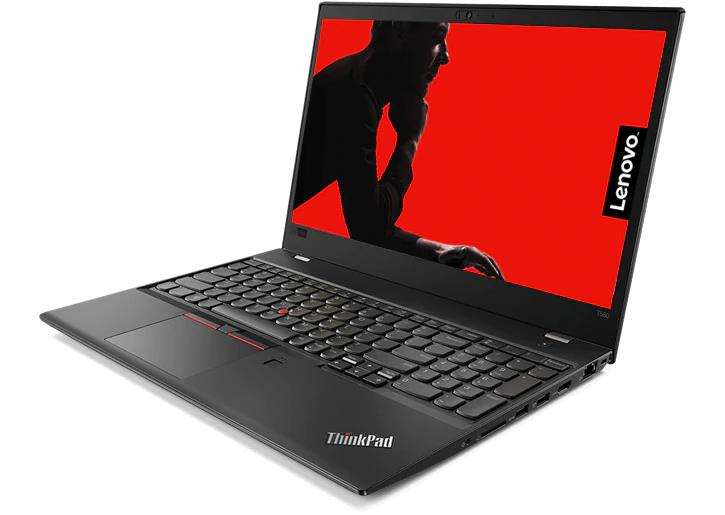
The ThinkPad T580 features a 15.6-inch non-touchscreen display, giving users more screen space for everyday productivity tasks. This can be particularly helpful when working with spreadsheets, viewing long documents or arranging multiple application windows side by side.
The larger screen may suit office professionals, accountants, students and business users who spend considerable time working at a desk.
Since the display is not touchscreen-enabled, navigation is handled through the keyboard, TrackPoint or touchpad. The supplied specifications do not confirm the screen resolution, so buyers who require a particular resolution should verify it before purchase.
5. A Full-Size Backlit Keyboard with Numeric Keypad
The ThinkPad T580 includes a full-size keyboard with a numeric keypad and backlighting. These features can make everyday typing and data entry more convenient.
The numeric keypad is useful for people who regularly work with figures, budgets, invoices and spreadsheets. Meanwhile, the keyboard backlight helps make the keys easier to see in dimly lit environments.
For office professionals and business owners who spend much of the day typing or entering data, this layout is a practical advantage.
6. TrackPoint and Touchpad for Flexible Navigation
The Lenovo ThinkPad T580 includes both a TrackPoint pointing device and a touchpad. This gives users more than one way to control the cursor and navigate applications.
The touchpad provides familiar laptop navigation, while the TrackPoint offers an alternative for users who prefer controlling the cursor without moving their hands away from the keyboard.
Having both options can be useful when working with documents, spreadsheets and other productivity applications.
7. Webcam with a Privacy Shutter
The built-in webcam supports everyday activities such as online meetings, remote learning and video calls. The privacy shutter provides a physical way to cover the camera when it is not in use.
This is useful for professionals who attend virtual meetings and users who value an additional layer of privacy. Before buying a pre-owned unit, check that the webcam works correctly and that the privacy shutter opens and closes properly.
8. Dual-Battery Configuration
The ThinkPad T580 is listed with a dual-battery configuration. Depending on the installed battery arrangement, battery condition and power settings, this design can provide additional flexibility for users who need to work away from a power outlet.
However, the presence of two batteries does not guarantee a specific runtime. Battery health, the applications being used, screen brightness and other factors all affect how long the laptop can run on battery power.
Because this is an Ex-USA business laptop, we recommend checking the health of the installed batteries and confirming their condition before purchasing.
9. Windows 11 Pro for Business and Productivity
This configuration comes with Windows 11 Pro 64-bit. The operating system supports everyday tasks such as document creation, spreadsheets, web browsing and compatible business applications.
Windows 11 Pro also includes features designed for professional and business environments. The usefulness of these features depends on how the laptop will be used and the software or organisational requirements involved.
Who Should Consider the Lenovo ThinkPad T580?
At Ryan and Troy Store, we recommend choosing a laptop based on the tasks it needs to handle. The ThinkPad T580 may suit:
- Office professionals: For documents, email, presentations, spreadsheets and routine office applications.
- Accountants and administrative staff: For data entry, financial records and spreadsheet work, with the help of the numeric keypad.
- Students: For research, assignments, online learning and presentations.
- Business owners: For routine administration, record keeping and compatible business software.
- Remote workers: For online meetings, communication tools and everyday productivity.
- Everyday users: For browsing, streaming and general computing.
The 15.6-inch screen and full-size keyboard are especially useful for users who prefer a larger working area. Those who prioritise a very lightweight laptop for frequent travel may want to compare its size and weight with smaller models.
What to Check Before Buying an Ex-USA ThinkPad T580
A laptop’s advertised specifications are only part of the buying decision. For a pre-owned business laptop, its physical condition and functionality are equally important.
Before purchasing the Lenovo ThinkPad T580, consider checking the following:
- Battery health: Confirm the condition of both batteries and whether they hold charge as expected.
- Display: Inspect for dead pixels, flickering, unusual marks or other screen issues.
- Keyboard and backlight: Test the keys, numeric keypad and keyboard illumination.
- TrackPoint and touchpad: Confirm that both pointing devices work correctly.
- Webcam and privacy shutter: Test the camera and check the shutter mechanism.
- Processor, RAM and storage: Verify the Intel Core i5-8250U, 16GB RAM and 256GB SSD configuration.
- Ports and connectivity: Test the available ports, Wi-Fi and Bluetooth.
- Operating system: Confirm Windows 11 Pro activation and functionality.
- Physical condition: Inspect the casing, hinges, charging connection and included accessories.
Why Buy the Lenovo ThinkPad T580 from Ryan and Troy Store?
At Ryan and Troy Store, we help customers compare laptops according to their specifications, intended use and budget. We understand that selecting a business laptop involves more than choosing a processor; memory, storage, screen size, keyboard features and battery condition all contribute to the buying decision.
The Lenovo ThinkPad T580 offers a combination of an Intel Core i5-8250U processor, 16GB RAM, a 256GB SSD and a 15.6-inch display. Its numeric keypad, backlit keyboard, webcam privacy shutter and dual-battery configuration provide additional features worth considering for professional use.
We encourage customers to confirm the exact configuration, condition of the individual unit, battery health, included accessories and applicable warranty terms before purchasing. This helps ensure that the laptop matches their requirements.
Final Verdict: Is the Lenovo ThinkPad T580 a Smart Buy?
The Lenovo ThinkPad T580 offers a practical combination of an 8th Generation Intel Core i5 processor, 16GB RAM, a 256GB SSD and a 15.6-inch display. The full-size backlit keyboard, numeric keypad, TrackPoint and dual-battery configuration add useful features for everyday productivity.
It is worth considering for professionals, students and business users who need a laptop for routine work, multitasking and office applications. The final decision should also take account of battery health, physical condition and the requirements of the software you intend to use.
Interested in owning The Lenovo ThinkPad T580?
You can also explore The Lenovo ThinkPad T580 for more information