
Blogs
5 Things You MUST Check Before Buying a Refurbished MacBook Pro

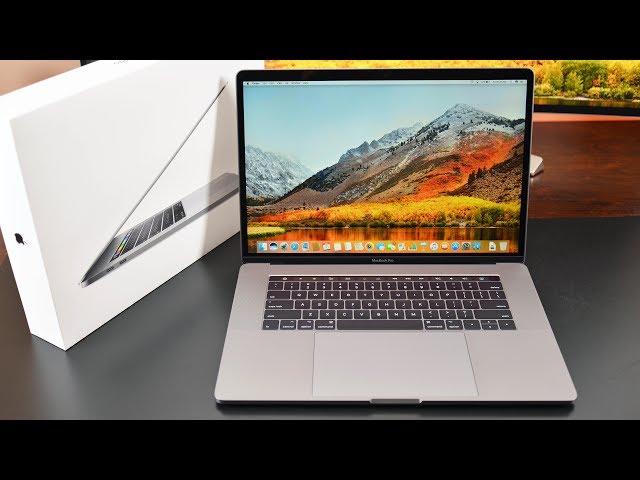
Buying a used MacBook Pro in 2026 can be one of the smartest ways to save money while still enjoying premium Apple performance. Models like the Apple MacBook Pro 15-inch (2018), Apple MacBook Pro A1707 (2017), and even the classic Apple MacBook Pro 15-inch (2010) still offer excellent value for students, creators, developers, and professionals.
However, buying a used MacBook is very different from buying a brand-new laptop. Two MacBooks with identical specifications can perform completely differently depending on battery condition, internal health, overheating history, and physical wear.
That is why understanding what to inspect before buying is extremely important.
This guide covers the most important things you should always check before purchasing a refurbished or pre-owned MacBook Pro.
1. Check the Battery Cycle Count & Battery Health
Battery condition is one of the biggest factors affecting a used MacBook’s reliability.
MacBook batteries naturally wear down over time. A laptop may look perfect externally while secretly having a heavily degraded battery that drains quickly or causes performance issues.
You should always check:
- Battery cycle count
- Battery condition status
- Charging reliability
- Unexpected shutdown behavior
Generally:
- Lower cycle counts are better
- “Normal” battery condition is ideal
- Swollen batteries are a major red flag
This becomes especially important with older Intel MacBooks like:
- Apple MacBook Pro A1707 (2017)
- Apple MacBook Pro 15-inch (2018)
Many older units already have worn batteries after years of heavy usage.
That is why models with NEW BATTERY replacements offer much better long-term value and reliability.
For older devices like the Apple MacBook Pro 15-inch (2010), battery replacement is often almost essential if you plan to use the laptop daily.
2. Inspect the Display for Screen Delamination
Older Retina MacBooks can develop a problem called screen delamination, sometimes known as “Staingate.”
This happens when the anti-reflective coating on the Retina display begins wearing off, creating:
- Smudged patches
- Visible marks
- Uneven reflections
- Distracting screen damage
The issue is especially common on:
- 2015–2017 Retina MacBooks
- Heavily used professional machines
Before buying any used MacBook:
- View the screen under bright light
- Check for marks around the keyboard area
- Inspect corners and edges carefully
- Test brightness consistency
A clean Retina display makes a huge difference in daily usage for:
- Students
- Designers
- Video editors
- Developers
- Office users
Since MacBook display repairs are expensive, this is something buyers should never ignore.
3. Test the Keyboard & Touch Bar Carefully
Apple’s butterfly keyboards remain one of the most discussed issues on older Intel MacBooks.
The:
- Apple MacBook Pro A1707 (2017)
- Apple MacBook Pro 15-inch (2018)
…both use butterfly keyboard designs that can sometimes develop:
- Sticky keys
- Double typing
- Unresponsive keys
- Inconsistent feedback
Before buying:
- Test every single key
- Type quickly across the keyboard
- Listen for unusual clicking
- Check for delayed response
You should also inspect the Touch Bar carefully.
Touch Bar failures can include:
- Flickering
- Black sections
- Unresponsive controls
- Display glitches
While the Touch Bar still feels premium when functioning properly, repairs can become expensive.
This is why professionally tested MacBooks matter so much when buying refurbished devices.
4. Check SSD Health & Overall Performance
Storage health is critical when buying a used MacBook.
Modern SSDs are fast and reliable, but heavily used drives can degrade over time.
Always check:
- Boot speed
- App launch speed
- File transfer performance
- System responsiveness
- Strange freezing behavior
This matters heavily on models like:
- Apple MacBook Pro 15-inch (2018) with 1TB SSD
- Apple MacBook Pro A1707 (2017) with 256GB SSD
The 2010 MacBook Pro is different because it still uses traditional HDD storage in many configurations.
If purchasing the Apple MacBook Pro 15-inch (2010), upgrading from HDD to SSD dramatically improves:
- Startup speed
- System responsiveness
- Multitasking
- Everyday usability
An SSD upgrade is one of the best investments for older MacBooks.
5. Watch for Overheating & GPU Problems
Intel MacBooks are known for generating heat during heavy workloads.
This becomes especially noticeable on the:
- Apple MacBook Pro 15-inch (2018)
- Apple MacBook Pro A1707 (2017)
During testing, check:
- Fan noise
- Excessive heat
- Random shutdowns
- Lag during heavy tasks
- Display flickering
The dedicated Radeon graphics in these models help with:
- Video editing
- Creative software
- Rendering
- Design work
…but GPU-related problems can appear in poorly maintained machines.
The older Apple MacBook Pro 15-inch (2010) also deserves extra attention because aging NVIDIA GPUs can sometimes develop long-term reliability issues.
If possible:
- Run video playback
- Test creative apps
- Stress the laptop lightly
- Monitor temperatures
A properly maintained MacBook should remain stable under normal workloads.
Don’t Forget to Check the Charger
One thing many buyers overlook is the charger.
A genuine Apple charger matters because fake or damaged chargers can:
- Damage the battery
- Cause inconsistent charging
- Overheat
- Reduce long-term battery health
Always inspect:
- Cable condition
- Connector wear
- Charging stability
- Power adapter authenticity
Reliable sellers typically include tested genuine-compatible charging accessories.
Why Buying from a Trusted Store Matters
The biggest mistake many buyers make is purchasing used MacBooks from unreliable sellers without proper testing.
Ryan and Troy Store helps reduce that risk by offering professionally checked refurbished Apple laptops ready for everyday use.
Buying from Ryan and Troy Store gives customers greater confidence through:
- Professionally tested MacBooks
- Carefully checked battery health
- Reliable hardware inspection
- Quality assurance
- Genuine Apple hardware
- Reliable customer support
- Competitive pricing
This matters especially with older Intel MacBooks where internal condition greatly affects long-term performance.
Visit us online.
Apple MacBook Pro A1707 (2017)
Quick Refurbished MacBook Buying Checklist
Before buying any used MacBook Pro, always check:
- Battery cycle count & battery condition
- Screen delamination or display damage
- Keyboard responsiveness
- Touch Bar functionality
- SSD health & performance
- Overheating issues
- GPU stability
- Genuine charger condition
- Physical body condition
- Seller reputation & testing process
Final Verdict
Buying a used MacBook Pro can save you a lot of money while still giving you access to premium Apple hardware and strong real-world performance. Models like the Apple MacBook Pro 15-inch (2018), Apple MacBook Pro A1707 (2017), and Apple MacBook Pro 15-inch (2010) still remain highly capable depending on your needs and budget.
However, condition matters far more than specifications alone.
Checking battery health, keyboard condition, screen quality, SSD performance, thermals, and charger authenticity can help you avoid expensive problems later.
And when buying a refurbished MacBook, choosing a trusted seller like Ryan and Troy Store gives you far greater peace of mind knowing the laptop has already been professionally inspected and prepared for reliable daily use.