
Blogs
Is 8GB RAM Enough? The HP EliteBook 735 Ryzen 7 Explained


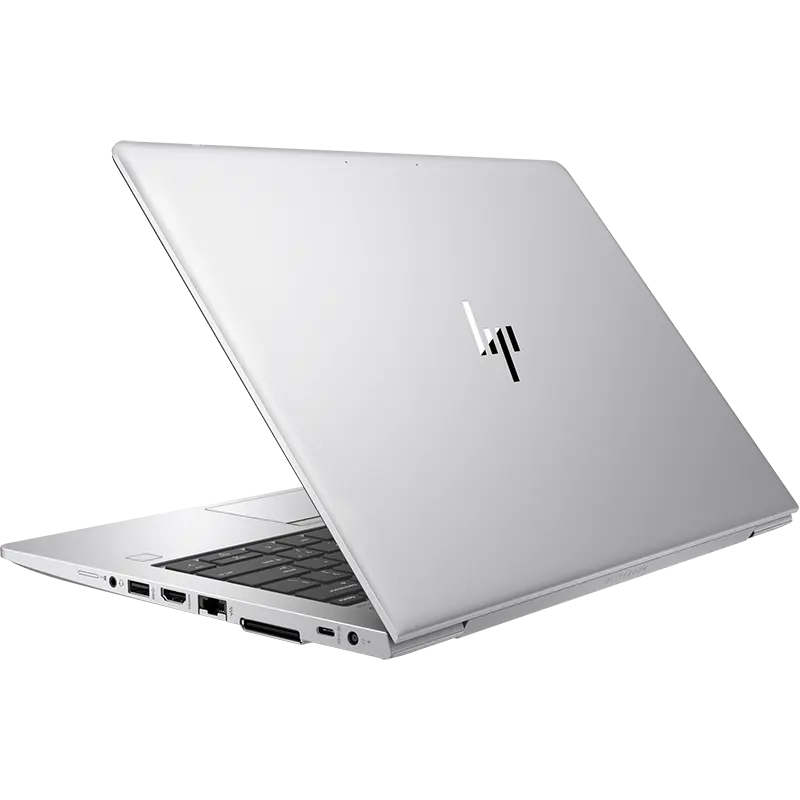
Looking for a compact laptop that combines strong everyday performance with convenient portability? At Ryan and Troy Store, we offer the HP EliteBook 735 Ryzen 7 for customers who need a practical laptop for work, study, and everyday computing. With an AMD Ryzen 7 processor, 8GB DDR4 RAM, a 256GB SSD, and a 13.3-inch Full HD display, this silver laptop brings together several useful features in a compact design.
But is 8GB RAM enough to get the job done? For everyday tasks such as browsing, preparing documents, attending online meetings, and managing business applications, it can be sufficient. The right choice ultimately depends on the applications you use and how much multitasking you do. Let’s look at what the HP EliteBook 735 offers and whether it suits your needs.
HP EliteBook 735 Ryzen 7 Specifications
Before choosing a laptop, it’s important to understand its main features. Here’s a summary of the specifications supplied for this HP EliteBook 735.
| Feature | Specification |
|---|---|
| Brand | HP |
| Model | EliteBook 735 |
| Processor | AMD Ryzen 7 |
| RAM | 8GB DDR4 |
| Storage | 256GB SSD |
| Graphics | Advertised as 2GB dedicated graphics |
| Display Size | 13.3 inches |
| Resolution | Full HD (1920 × 1080) |
| Connectivity | Wi-Fi and Bluetooth |
| Ports | USB 3.0, USB-C, HDMI, audio jack |
| Webcam | HD webcam |
| Colour | Silver |
| Condition | Pre-owned, tested and fully functional |
1. Is 8GB RAM Enough for the HP EliteBook 735?
The short answer is yes for many everyday tasks. With 8GB DDR4 RAM, the HP EliteBook 735 can handle document editing, web browsing, email, presentations, online learning, and common office applications.
For example, you can research information online while preparing an assignment, manage spreadsheets, or attend a virtual meeting while keeping other everyday applications open. These activities generally fit within the needs of an 8GB laptop, although performance depends on the applications running and the rest of the hardware.
However, if you regularly work with large datasets, edit complex video projects, run virtual machines, or keep many memory-intensive applications open at once, 8GB may become a limitation. At Ryan and Troy Store, we recommend matching the laptop’s memory to your workload rather than paying for specifications you may not need.
2. What Does the AMD Ryzen 7 Processor Bring to the Table?
The AMD Ryzen 7 processor is the main performance feature advertised for this HP EliteBook 735. Ryzen 7 processors are available in different generations and configurations, so the exact model matters when comparing performance.
For everyday work, a suitable Ryzen 7 configuration can support office applications, research, multitasking, and general productivity. This makes the laptop worth considering for professionals who need a compact machine for routine work and communication.
Before purchasing, confirm the exact Ryzen 7 processor model with us. Knowing the generation helps you compare the laptop more accurately with other available options and understand whether it meets the demands of your preferred software.
3. Is a 256GB SSD Enough for Your Files?
The 256GB SSD gives you space for your operating system, applications, documents, presentations, and personal files. SSD storage also generally offers faster file access and application loading than a traditional mechanical hard drive.
For students and office users who primarily work with documents and online services, this capacity can be a practical starting point. If you store many large videos, photographs, or software packages, however, the available space may fill up quickly.
You can manage storage by moving larger files to an external drive or using cloud storage. We also recommend confirming the installed SSD capacity and condition before purchasing your HP EliteBook 735.
4. What Does the 2GB Dedicated Graphics Specification Mean?
The supplied product specification advertises 2GB dedicated graphics. Graphics capability can affect tasks such as image editing, video work, gaming, and applications that use graphics acceleration.
However, the exact graphics processor has not been provided, so we cannot confirm its capabilities from the 2GB figure alone. Dedicated graphics memory does not automatically mean that a laptop will perform well in demanding games or professional graphics applications. The graphics chip itself is an important factor.
If graphics performance is a priority, contact us to confirm the exact graphics hardware fitted to the unit. This will help you determine whether it is suitable for your preferred applications.
5. Work Comfortably on the 13.3-Inch Full HD Display
The HP EliteBook 735 features a 13.3-inch display with Full HD resolution of 1920 × 1080. This gives you a detailed workspace for reading documents, preparing reports, browsing websites, and attending online meetings.
Its compact screen size is useful for customers who travel frequently or move between home, school, and the office. You get a portable laptop without giving up Full HD resolution.
If you spend long hours working with multiple windows or large spreadsheets, you may prefer connecting an external monitor when working at a desk. Before buying, inspect the display for scratches, dead pixels, and uneven brightness.
6. Stay Connected with Useful Ports and Wireless Features
The HP EliteBook 735 includes Wi-Fi and Bluetooth connectivity, allowing you to connect to compatible wireless networks and accessories. These features are useful for accessing online services, transferring files, and connecting wireless peripherals.
The listed ports include USB 3.0, USB-C, HDMI, and an audio jack. Depending on the capabilities of the specific ports, you can connect compatible storage devices, headphones, and an external display.
We recommend checking that each port works properly on the actual unit before purchasing. If you rely on a particular accessory or monitor, confirm compatibility first.
7. Is the HP EliteBook 735 Suitable for Online Meetings?
The listed HD webcam makes this laptop suitable for everyday video communication, including online classes, remote meetings, and virtual interviews. Combined with Wi-Fi connectivity, it provides the basic features needed for many common communication tasks.
Video quality depends on lighting, camera condition, and the software being used. If you work remotely, test the webcam, microphone, speakers, and wireless connection before buying. A good internet connection also plays an important role in the quality of video calls.
8. Who Should Buy the HP EliteBook 735 Ryzen 7?
At Ryan and Troy Store, we encourage customers to choose a laptop based on their daily needs. The HP EliteBook 735 may suit:
- Students: For assignments, research, presentations, and online learning.
- Office professionals: For documents, email, spreadsheets, and business applications.
- Small business owners: For everyday administration, online tools, and record keeping.
- Remote workers: For browser-based work, virtual meetings, and routine communication.
- Frequent travellers: For everyday computing in a compact 13.3-inch format.
- Everyday users: For browsing, streaming, writing, and managing personal files.
If your work involves demanding video editing, advanced 3D applications, intensive gaming, or heavy multitasking, let us know what you need the laptop to run so you can compare suitable alternatives.
9. What to Check Before Buying a Pre-Owned HP EliteBook 735
Choosing a pre-owned laptop requires more than checking its processor and memory. The actual condition of the unit affects its usability and value.
Before purchasing, we recommend checking the following:
- Processor: Confirm the exact AMD Ryzen 7 model and generation.
- RAM: Verify that the laptop has 8GB DDR4 installed and ask about upgrade options if needed.
- Storage: Confirm the 256GB SSD capacity and check its condition.
- Graphics: Identify the exact graphics processor and verify the advertised 2GB specification.
- Display: Check the Full HD screen for dead pixels, scratches, and uneven brightness.
- Battery: Test how well it holds a charge.
- Keyboard and touchpad: Check the keys, buttons, and gestures.
- Ports: Test USB 3.0, USB-C, HDMI, and the audio jack.
- Webcam and audio: Test the camera, microphone, and speakers.
- Wireless connectivity: Confirm that Wi-Fi and Bluetooth work correctly.
- Physical condition: Inspect the casing, hinges, and charging connection.
- Warranty and returns: Confirm the terms that apply to the purchase.
These checks help you understand the condition of the laptop and whether it meets your requirements before committing to a purchase.
10. Why Buy the HP EliteBook 735 from Ryan and Troy Store?
At Ryan and Troy Store, our aim is to help customers find laptops that fit their work, study, and everyday computing needs. The HP EliteBook 735 Ryzen 7 offers a combination of an AMD Ryzen 7 processor, 8GB RAM, SSD storage, and a compact Full HD display.
Before buying, contact us to confirm current availability, pricing, the exact processor model, graphics hardware, and the condition of the unit. You can also ask about included accessories and any applicable warranty or return terms. This gives you the information needed to make a confident, informed decision.
Is the HP EliteBook 735 Ryzen 7 Worth Buying in Kenya?
The HP EliteBook 735 Ryzen 7 is worth considering if you want a compact laptop for everyday productivity, office work, study, and online communication. Its 8GB RAM can be sufficient for common tasks, while the 256GB SSD provides space for essential applications and files.
The most important factors are the exact Ryzen 7 generation, the identity of the advertised graphics hardware, and the laptop’s overall condition. If you need to run demanding applications or perform intensive multitasking, consider whether 8GB RAM and the available graphics configuration will be sufficient for your workload.
Interested in owning The HP EliteBook 735 Ryzen 7?
You can also explore The HP EliteBook 735 Ryzen 7 for more information