
Blogs
Is the Dell Latitude 5430 Worth Buying in Kenya?


Buying a reliable laptop in Kenya doesn’t always mean spending a fortune on a brand-new model. With the growing availability of quality USA pre-owned laptops, buyers can access business-class machines with impressive specifications at potentially more affordable prices. One laptop worth considering is the Dell Latitude 5430, a business-oriented notebook designed for productivity, multitasking, and professional use.
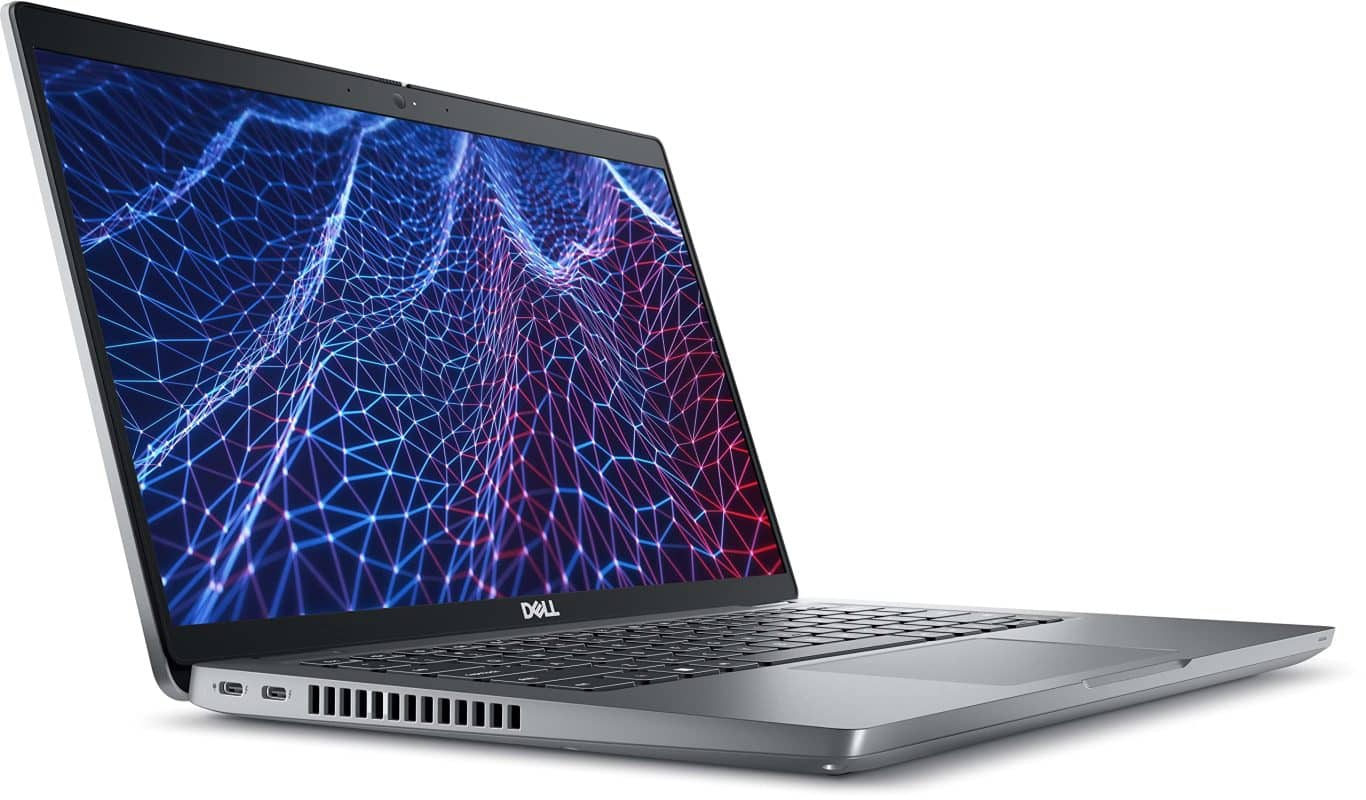
Powered by a 12th Generation Intel Core i7-1265U processor, this laptop comes with 16GB DDR4 RAM, a 512GB NVMe SSD, and a 14-inch Full HD anti-glare display. It also features Windows 11 Pro, Intel Iris Xe Graphics, a backlit keyboard, and a fingerprint reader, making it an appealing option for students, professionals, and business owners.
However, is the Dell Latitude 5430 still a good investment in 2026? More importantly, should you consider buying a USA pre-owned model instead of a newer laptop? Let’s explore its performance, features, practical benefits, and what Kenyan buyers should know before making a purchase.
What Makes the Dell Latitude 5430 Special?
The Dell Latitude 5430 stands out because it combines business-focused features with hardware that remains capable of handling many modern computing tasks. Unlike entry-level laptops designed mainly for basic browsing and document editing, this configuration offers a stronger foundation for multitasking and professional productivity.
One of its biggest advantages is the Intel Core i7-1265U processor, which features 10 cores and can reach turbo speeds of up to 4.8GHz under suitable conditions. Combined with 16GB DDR4 RAM running at 3200MHz, the laptop can handle many everyday professional workloads, including spreadsheets, presentations, browser-based applications, and virtual meetings.
The 14-inch Full HD anti-glare display is another practical advantage, especially for users who spend long hours working on their computers. Additionally, the presence of Thunderbolt 4, Gigabit Ethernet, a fingerprint reader, and Windows 11 Pro makes this a well-equipped business laptop.
For Kenyan buyers looking for an EX-USA laptop, these features make the Latitude 5430 worth considering, provided the unit is in good condition and competitively priced.
Intel Core i7-1265U: Strong Performance for Everyday Work
The Dell Latitude 5430 comes equipped with a 12th Generation Intel Core i7-1265U processor featuring 10 cores. It has a listed processor speed of 1.80GHz and can reach up to 4.8GHz through Intel’s Turbo Boost technology when workload and operating conditions allow.
This processor is designed to balance performance and efficiency, making it suitable for many office, academic, and business applications. For example, users can work with Microsoft Office applications, manage spreadsheets, conduct online research, and switch between common productivity programs.
Its multi-core architecture also helps when several tasks need processing resources at the same time. However, actual performance depends on factors such as cooling, power settings, memory usage, and the software being used.
For buyers who need a laptop primarily for professional productivity rather than demanding gaming or high-end graphics work, the Core i7-1265U remains a practical processor choice in 2026.
16GB DDR4 RAM for Smooth Multitasking
Memory plays a significant role in how comfortably a laptop handles several programs simultaneously. The Dell Latitude 5430 includes 16GB DDR4 RAM running at 3200MHz, which provides a useful amount of memory for everyday multitasking.
For instance, an office professional can work on a spreadsheet while keeping multiple browser tabs and communication applications open. Similarly, university students can research assignments, prepare presentations, and use online learning platforms without constantly closing programs to free up memory.
The 16GB configuration is also useful for developers working on smaller projects and professionals using moderately demanding productivity software. Nevertheless, users running large virtual machines, extensive datasets, or highly specialized applications should confirm their memory requirements before purchasing.
512GB NVMe SSD for Faster Storage Access
The laptop features a 512GB NVMe SSD, offering both convenient storage capacity and fast data access. NVMe solid-state drives are designed to communicate efficiently with the system, helping reduce delays when opening files and loading supported applications.
Compared with traditional mechanical hard drives, SSDs generally improve system responsiveness, operating system startup times, and file access. This can make a noticeable difference for users who frequently open documents, move between applications, or work with stored project files.
With 512GB storage, there’s room for Windows 11 Pro, essential software, academic materials, business documents, and personal files. However, users who frequently handle large media projects may eventually need external or additional storage.
14-Inch Full HD Anti-Glare Display
The Dell Latitude 5430 has a 14-inch Full HD display with a resolution of 1920 × 1080 pixels. This provides a practical balance between screen space and portability, making it suitable for people who regularly work from different locations.
The anti-glare finish helps reduce distracting reflections from nearby light sources. This can be particularly useful in offices, classrooms, and other environments with overhead lighting or bright windows.
Full HD resolution also provides clear text and detailed visuals for spreadsheets, presentations, documents, and video content. While a larger display may be preferable for extensive creative work, the 14-inch size is a convenient option for everyday productivity.
Intel Iris Xe Graphics for Everyday Visual Tasks
This configuration includes Intel Iris Xe Graphics, an integrated graphics solution designed for everyday visual computing. It can support common activities such as watching high-resolution videos, running productivity applications, and handling standard graphical interfaces.
The integrated graphics can also be useful for basic image editing and less demanding visual applications, depending on the software requirements. However, it should not be confused with a dedicated high-performance graphics card.
If your work involves intensive 3D rendering, demanding gaming, or professional GPU-heavy software, a laptop with dedicated graphics may be more suitable.
Windows 11 Pro for Business Productivity
The Dell Latitude 5430 comes with Windows 11 Pro 64-bit, making it appealing to professionals and businesses that rely on Microsoft’s operating system.
Windows 11 Pro includes business-oriented capabilities such as BitLocker device encryption and Remote Desktop hosting, subject to proper configuration and system requirements. These features may be useful for organizations that need additional device management and security options.
For ordinary users, Windows 11 also supports a wide range of modern productivity applications and everyday software. Before purchasing a USA pre-owned unit, confirm that Windows is properly activated and updated.
The Hidden Benefits of the Dell Latitude 5430
While the processor and memory specifications are impressive, several other features make the Dell Latitude 5430 particularly useful for everyday computing.
1. Thunderbolt 4 Provides Flexible Connectivity
One of the less obvious advantages of this laptop is its dual USB-C connectivity with Thunderbolt 4 support. These ports provide options for connecting compatible external devices, displays, and accessories.
Depending on the equipment being used, Thunderbolt 4 can support high-speed data transfers and convenient docking arrangements. The listed DisplayPort and Power Delivery support also adds flexibility when connecting compatible monitors and charging equipment.
For professionals who regularly work with external displays or desk accessories, these connections can make it easier to create a practical workstation.
2. A Backlit Keyboard Makes Working in Low Light Easier
The Dell Latitude 5430 features a backlit keyboard, a simple addition that can make everyday work more convenient. Keyboard illumination helps users identify keys when working in dimly lit environments.
This can be especially useful for students studying at night, professionals working during travel, or anyone using their laptop in rooms with limited lighting.
Although a backlit keyboard doesn’t improve processor performance, it can make the overall working experience more comfortable.
3. Fingerprint Authentication Adds Convenience
The integrated fingerprint reader provides another way to authenticate your identity when signing in to supported Windows features.
When properly configured, fingerprint authentication can make logging in more convenient than typing a password every time. It can also form part of a more secure sign-in setup.
For professionals who access their laptops frequently throughout the day, this is a practical feature worth having.
4. Webcam Privacy Shutter Offers More Control
Privacy is an important consideration, especially for professionals who regularly attend virtual meetings or work with sensitive information.
The Latitude 5430 includes an HD webcam with a privacy shutter. The shutter provides a physical way to cover the camera when it isn’t being used, giving users more control over camera access.
This can be useful for people working from home, attending online classes, or joining frequent video conferences.
5. A Good Selection of Ports Reduces Adapter Dependence
Modern laptops sometimes sacrifice connectivity in favor of thinner designs. Fortunately, the Dell Latitude 5430 offers several connection options, including USB-A, USB-C, HDMI, Gigabit Ethernet, microSD, and a 3.5mm audio jack.
This variety is convenient for users who regularly connect flash drives, external monitors, wired networks, or audio accessories. For example, HDMI can connect the laptop to a compatible display, while Gigabit Ethernet provides an option for wired network access.
Having these ports built into the laptop may reduce the need to carry multiple adapters for everyday connections.
6. The 14-Inch Size Balances Portability and Productivity
A 14-inch laptop offers a useful middle ground between compact devices and larger notebooks. The display provides enough room for many everyday tasks without requiring the desk space associated with larger machines.
For Kenyan professionals who move between offices, meetings, and client locations, this screen size may be convenient. University students can also benefit from a laptop that fits into typical study environments.
Actual portability depends on the laptop’s weight and battery condition, but the 14-inch format offers a practical starting point.
Who Should Buy the Dell Latitude 5430 in Kenya?
The Dell Latitude 5430 is suitable for several categories of users, particularly those who prioritize productivity, connectivity, and multitasking.
University and College Students
Students need laptops that can handle research, assignments, presentations, online classes, and educational software. The Latitude 5430’s Core i7 processor, 16GB RAM, and 512GB SSD make it a capable option for many academic activities.
It may also suit students taking programming, business, or data-related courses, depending on the software involved. The anti-glare display and backlit keyboard are additional conveniences for extended study sessions.
Office Workers and Business Professionals
For office professionals, the Dell Latitude 5430 offers a practical combination of performance and connectivity. It can support many common workflows involving spreadsheets, reports, email, virtual meetings, and business management applications.
Windows 11 Pro, a fingerprint reader, Ethernet connectivity, and Thunderbolt 4 are particularly relevant features for business environments. These can be useful when working with external devices, company networks, and supported security systems.
Freelancers and Remote Workers
Freelancers often work across several applications and need a laptop that can adapt to different environments. With 16GB RAM and a 512GB NVMe SSD, the Latitude 5430 provides useful resources for managing documents, communication platforms, and online services.
The HD webcam also supports video calls, while the 14-inch display offers a practical size for working from home or other locations. However, users who depend on specialized software should confirm compatibility before purchasing.
Developers and IT Students
The Dell Latitude 5430 may also appeal to programmers and IT students working with code editors, development environments, databases, and smaller software projects.
Its Core i7 processor and 16GB RAM provide a useful foundation for many programming tasks. However, extensive virtualization, large development environments, and resource-intensive workloads may require additional memory or stronger hardware.
Small Business Owners
Running a business often involves managing invoices, stock records, spreadsheets, customer communication, and online platforms. The Latitude 5430 offers suitable specifications for many of these activities.
Its range of ports also provides useful connectivity options for compatible office accessories and network equipment. For business owners looking for an affordable EX-USA laptop, it is worth evaluating against other options at a similar price.
What to Check Before Buying a Dell Latitude 5430 EX-USA Laptop
Because this Dell Latitude 5430 is a USA pre-owned device, its actual condition matters just as much as its specifications. Before purchasing, inspect the laptop carefully and ask the seller to demonstrate its main functions.
1. Check the Battery Health
Battery capacity gradually decreases as laptops age. A pre-owned laptop may therefore offer less battery life than it did when new, even if it performs well while connected to power.
Ask the seller for a battery health report where possible and test the laptop while unplugged. This is especially important if you plan to use it during lectures, meetings, or travel.
2. Verify the Processor, RAM, and Storage
Confirm that the laptop contains the Intel Core i7-1265U processor, 16GB DDR4 RAM, and 512GB NVMe SSD advertised. You can request a demonstration of the system information in Windows.
It’s also worth checking the SSD’s condition, particularly if the laptop has been used extensively. Verifying these specifications helps ensure that the actual device matches the listing.
3. Inspect the Full HD Display
Check the 14-inch display for cracks, dead pixels, discoloration, unusual brightness differences, or other visual defects.
Open different images and adjust the screen brightness to help identify problems. Also inspect the display hinges to ensure they operate correctly.
4. Test the Keyboard, Fingerprint Reader, and Webcam
Make sure every keyboard key works and that the backlight functions properly. Test the fingerprint reader through its supported Windows settings and confirm that the webcam produces a usable image.
Don’t forget to inspect the webcam privacy shutter and ensure it opens and closes correctly. These features are among the laptop’s practical advantages, so their functionality is important.
5. Check the USB-C, HDMI, and Other Ports
Test the available ports using compatible devices wherever possible. Confirm that USB-A connections work, check HDMI output, and verify that the laptop charges correctly through its supported charging connection.
If you depend on Thunderbolt 4 equipment, ask whether the relevant functionality can be demonstrated. Also check Ethernet, Wi-Fi, Bluetooth, and audio connectivity.
6. Confirm Windows 11 Pro Activation
Since this configuration includes Windows 11 Pro, verify that the installed operating system is properly activated.
Also confirm that the laptop can receive current updates and that any previous owner’s accounts or management restrictions have been cleared.
7. Ask About the Warranty and Accessories
Before making payment, ask whether the laptop comes with a compatible charger and whether any accessories are included.
You should also confirm the warranty period, what it covers, and the seller’s return or exchange terms. For a pre-owned laptop, these details can significantly affect the overall value of the purchase.
Why Choose Ryan and Troy Store?
Finding a suitable laptop involves more than selecting a processor and memory configuration. It’s equally important to understand the device’s condition, compare available options, and choose a laptop that matches your daily computing requirements.
If you’re considering the Dell Latitude 5430 in Kenya, Ryan and Troy Store is a place to enquire about the model and explore available purchasing options. Before committing to a purchase, confirm its current stock status, selling price, physical condition, battery health, and included accessories.
You can also ask about the installed Windows version, warranty terms, and whether the available configuration matches your intended use. Taking time to confirm these details can help you make a more informed decision and avoid buying hardware that doesn’t meet your needs.
Is the Dell Latitude 5430 Worth Buying in Kenya in 2026?
The Dell Latitude 5430 is still a worthwhile laptop to consider in Kenya in 2026, particularly for students, office workers, freelancers, and business professionals who want a capable everyday computer.
Its Intel Core i7-1265U processor, 16GB DDR4 RAM, and 512GB NVMe SSD provide a strong foundation for regular productivity tasks and multitasking. The 14-inch Full HD anti-glare display, Windows 11 Pro, fingerprint reader, backlit keyboard, and Thunderbolt 4 connectivity also add practical value.
However, it’s important to recognize that this is a USA pre-owned laptop. Its selling price, battery condition, physical wear, and remaining useful life will influence whether it’s actually a better purchase than other new or refurbished alternatives.
If you’re primarily working with documents, spreadsheets, online platforms, programming tools, or business applications, this configuration offers useful capabilities. On the other hand, users who require intensive gaming, advanced 3D rendering, or demanding GPU-based software should consider laptops with more specialized graphics hardware.
Ultimately, the Dell Latitude 5430 can be a smart EX-USA laptop purchase in Kenya, provided the price is competitive and the device is in good working condition. It combines business-oriented features with specifications that remain relevant for many everyday computing needs.
Interested in owning the Dell Latitude 5430?
You can also explore the Dell Latitude 5430 for more information